How to Sign Up and Enroll in Courses on Madarsa — A Step-by-Step Guide
مدرسہ پر اکاؤنٹ کیسے بنائیں اور کورس میں داخلہ کیسے لیں — مکمل گائیڈ

Imranul Haque Noor
An Engineer, an all time Learner and a Learning enabler.
📚 How to Sign Up and Enroll on Madarsa
A complete step-by-step guide — with real screenshots — for first-time students. Bilingual: English first, اردو ترجمہ collapsible after every section.
اردو ترجمہ — Urdu Translation
یہ گائیڈ کس کے لیے ہے؟ — اگر آپ پہلی بار مدرسہ (Madarsa) پلیٹ فارم پر آ رہے ہیں اور یہ سمجھنا چاہتے ہیں کہ اکاؤنٹ (Account) کیسے بنائیں، کورسز کیسے ڈھونڈیں، اور کسی کورس میں داخلہ (Enrollment) کیسے لیں — تو یہ مضمون آپ کے لیے ہے۔ ہر قدم پر اصل اسکرین شاٹ (Screenshot) دیا گیا ہے، اور ہر سیکشن کے نیچے اردو ترجمہ ملے گا۔
کوئی پچھلی تجربہ ضروری نہیں۔ بس ایک موبائل (Mobile) یا کمپیوٹر (Computer)، انٹرنیٹ (Internet)، اور ایک ای میل ایڈریس (Email Address) درکار ہے۔
🌍 What is Madarsa?
Madarsa is an Islamic and modern education platform offering courses in Urdu, Hindi, and English. You'll find Quran & Arabic courses next to Excel, Python, AI tools, and career skills like PMP or Scrum Master. Most paid courses sit in the ₹149–₹599 range with strong founder pricing — many come with deep discounts off the original MRP.
اردو ترجمہ — Urdu Translation
مدرسہ (Madarsa) کیا ہے؟ — یہ ایک تعلیمی پلیٹ فارم (Education Platform) ہے جہاں آپ اسلامی علوم کے ساتھ ساتھ جدید مہارتیں جیسے ایکسل (Excel)، پائتھون (Python)، اے آئی ٹولز (AI Tools)، اسٹاک مارکیٹ (Stock Market)، اور پروفیشنل سرٹیفکیشنز (Professional Certifications) جیسے پی ایم پی (PMP) اور سکرم ماسٹر (Scrum Master) سیکھ سکتے ہیں۔ زبانیں: اردو (Urdu)، ہندی (Hindi)، اور انگریزی (English)۔ زیادہ تر کورسز ۱۴۹ تا ۵۹۹ روپے کے درمیان ہیں، اور بانی قیمت (Founder Price) پر اصل ایم آر پی (MRP) سے بڑی رعایت ملتی ہے۔
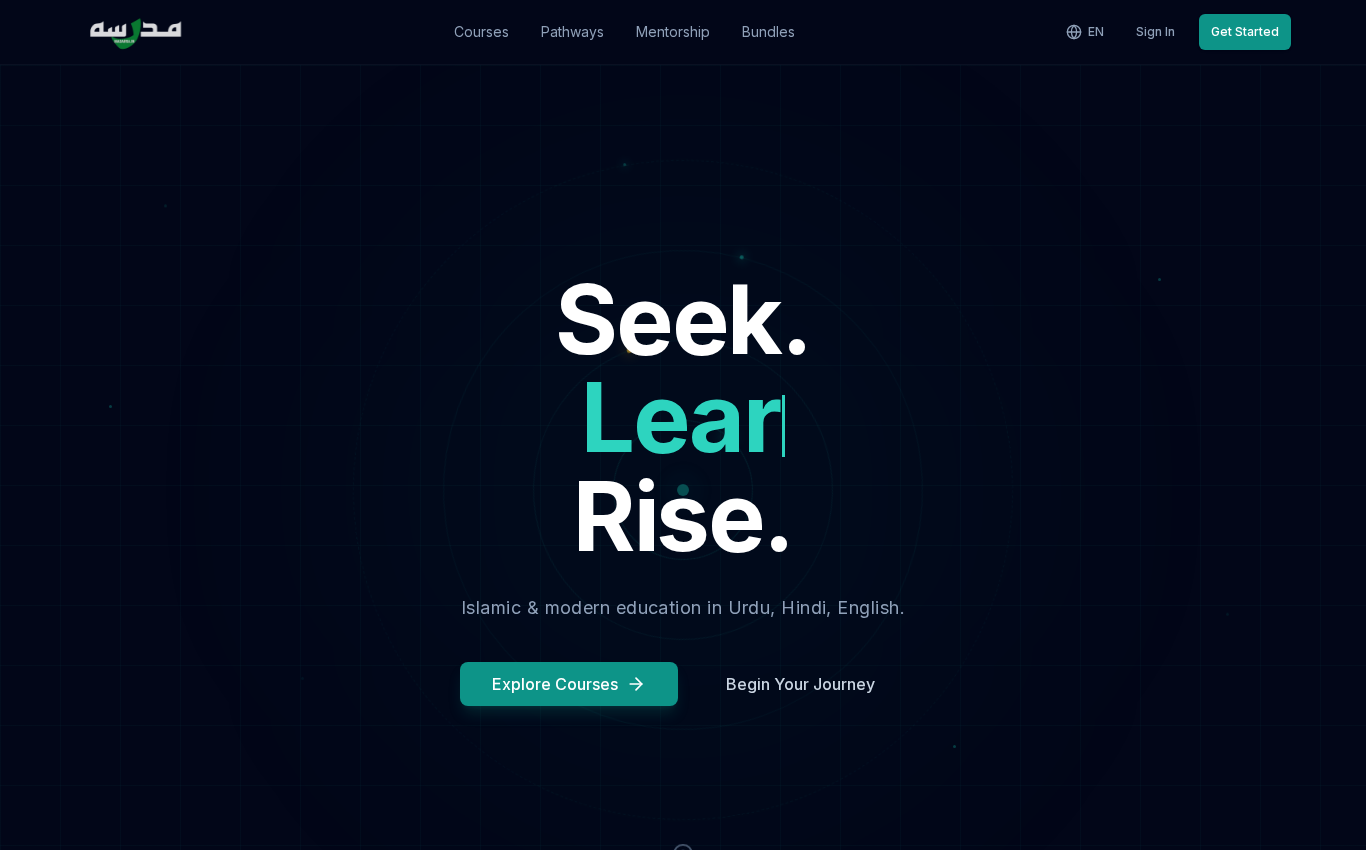
اوپر دی گئی تصویر مدرسہ کے ہوم پیج (Homepage) کی ہے۔ اوپر دائیں جانب آپ کو زبان تبدیل کرنے کا بٹن (EN / UR / HI) اور سائن اِن (Sign In) اور گیٹ اسٹارٹڈ (Get Started) کے بٹن نظر آئیں گے۔
🪜 Step 1 — Open madarsa.in
Open any browser on your phone or laptop and type madarsa.in in the address bar. You'll land on the homepage shown above. There's nothing to install — Madarsa works fully in the browser, including on mobile.
If you'd prefer reading in Urdu or Hindi, click the globe icon at the top right and switch the language. The whole site flips, including course pages.
اردو ترجمہ — Urdu Translation
پہلا قدم — مدرسہ پلیٹ فارم کھولیں: اپنے موبائل (Mobile) یا لیپ ٹاپ (Laptop) پر کوئی بھی براؤزر (Browser) جیسے کروم (Chrome)، فائرفاکس (Firefox)، یا سفاری (Safari) کھولیں اور ایڈریس بار (Address Bar) میں لکھیں madarsa.in۔ کوئی ایپ (App) ڈاؤن لوڈ کرنے کی ضرورت نہیں — یہ پلیٹ فارم براؤزر میں ہی پوری طرح چلتا ہے، موبائل پر بھی۔
اگر آپ اردو یا ہندی میں پڑھنا چاہتے ہیں تو اوپر دائیں جانب گلوب کے آئیکن (Globe Icon) پر کلک کریں اور زبان تبدیل کر لیں۔ پوری ویب سائٹ ترجمہ ہو جائے گی، کورس پیج (Course Page) سمیت۔
🔍 Step 2 — Browse all available courses
Click Courses in the top navigation. This opens the catalogue of every published course on the platform, with filters for category, difficulty, language, price, and instructor.
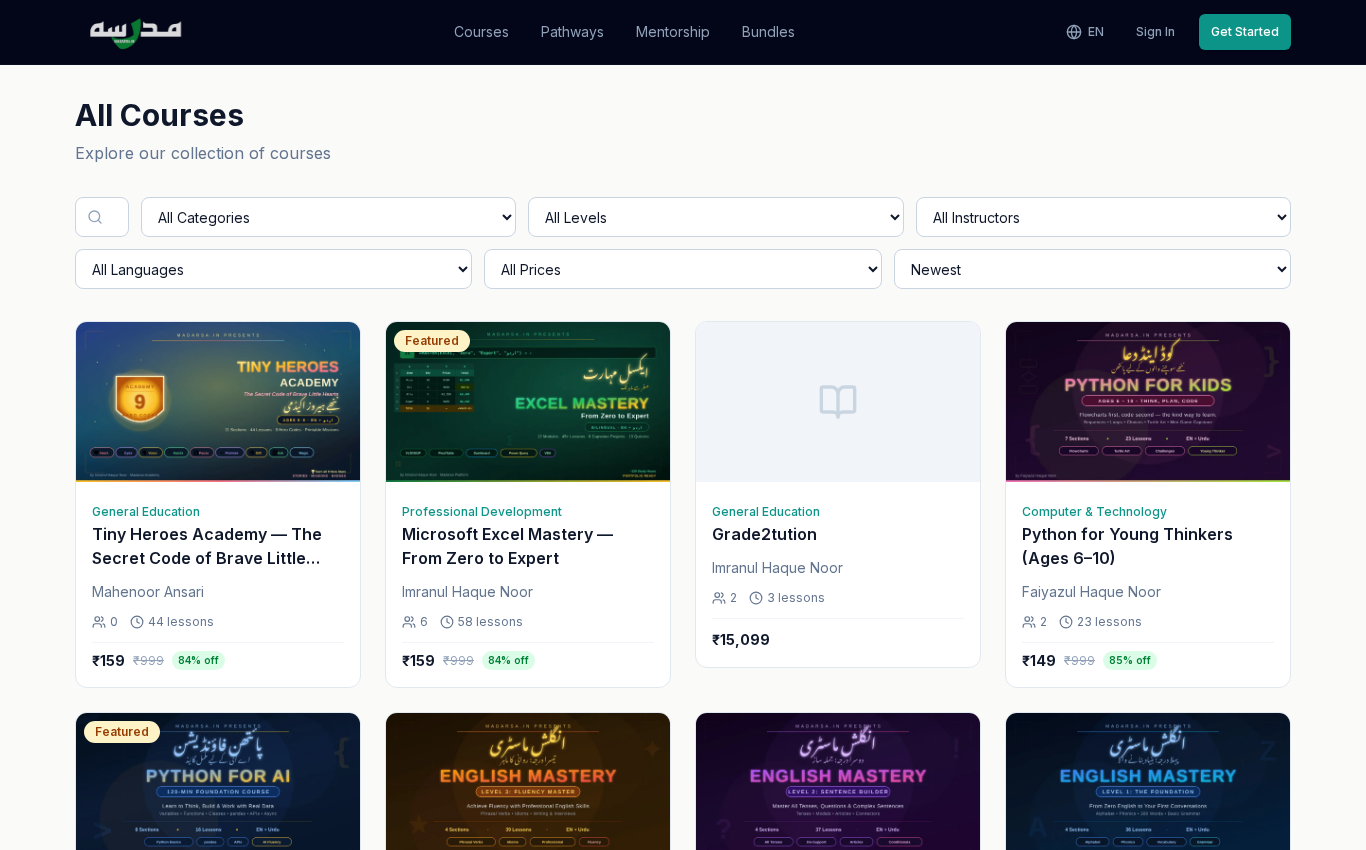
Each card shows: course thumbnail, title, level (beginner / intermediate / advanced), language, and the price. If a course has an MRP, you'll see the original price struck through and the current selling price next to it, plus the % discount badge.
اردو ترجمہ — Urdu Translation
دوسرا قدم — تمام کورسز دیکھیں: اوپر مینیو میں کورسز (Courses) پر کلک کریں۔ یہاں آپ کو پلیٹ فارم پر شائع شدہ ہر کورس کی فہرست (List) ملے گی۔ بائیں طرف فلٹر (Filter) آپشنز ہیں — زمرہ (Category)، مشکل کی سطح (Difficulty Level)، زبان (Language)، قیمت (Price) اور استاد (Instructor)۔
ہر کارڈ (Card) پر کورس کا تھمب نیل (Thumbnail)، عنوان (Title)، سطح (Level)، زبان (Language) اور قیمت (Price) لکھی ہوگی۔ اگر کورس پر رعایت ہے تو اصل ایم آر پی (Original MRP) کاٹ کر فروخت قیمت (Selling Price) دکھائی جائے گی اور رعایت کا فیصد بھی نظر آئے گا۔
📖 Step 3 — Open a course you like
Tap any course card to open the course detail page. Here you'll see the full description, what you'll learn, the instructor's profile, the curriculum (sections + lessons), reviews, and an enrolment box on the right.
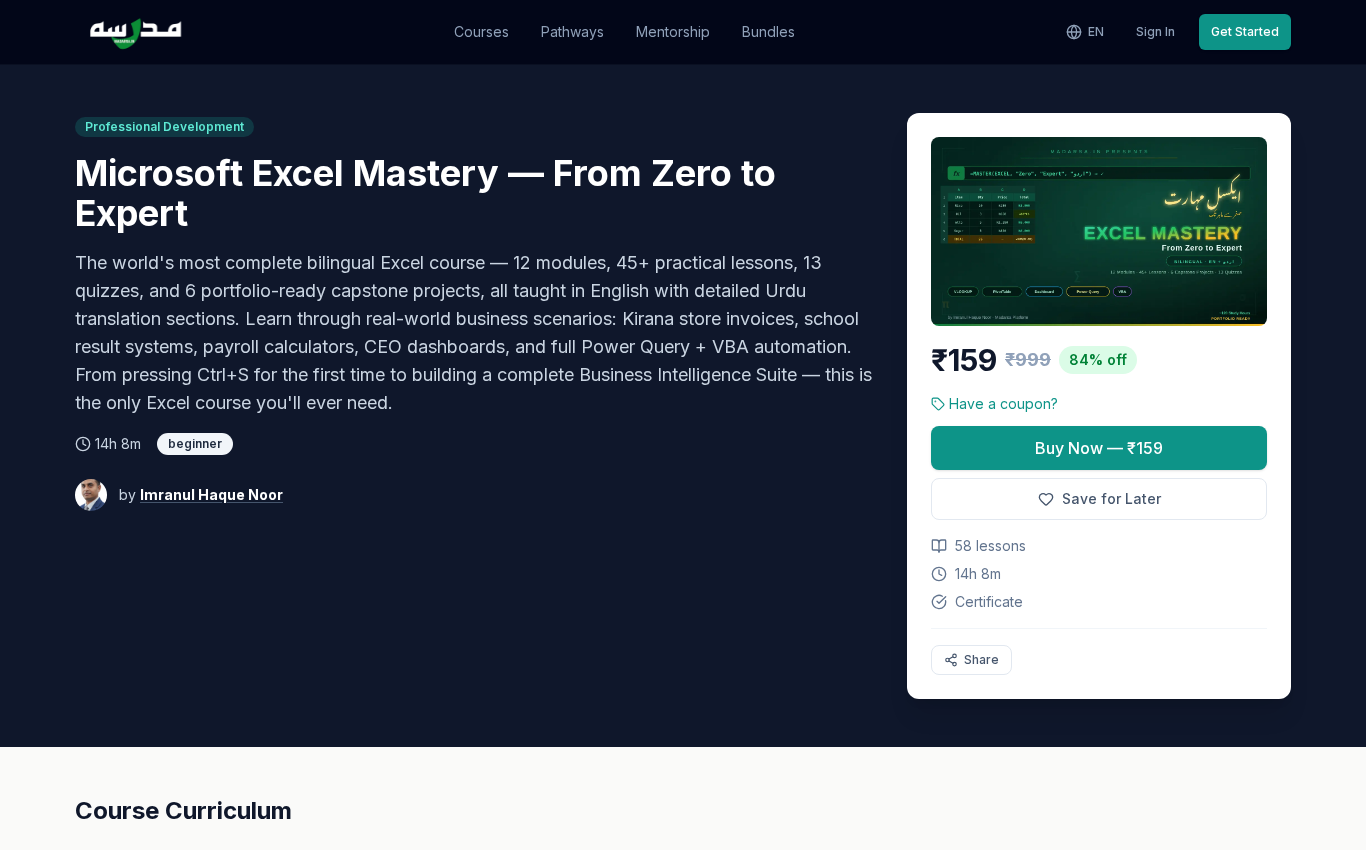
You can browse the full curriculum without signing in. Some lessons are marked Preview — you can watch them as a guest before deciding to enroll.
اردو ترجمہ — Urdu Translation
تیسرا قدم — اپنی پسند کا کورس کھولیں: کسی بھی کورس کارڈ (Course Card) پر کلک کریں۔ اب آپ کے سامنے کورس کا مکمل صفحہ کھل جائے گا۔ اس صفحے پر آپ کو ملے گا: کورس کی تفصیل (Description)، آپ کیا سیکھیں گے، استاد (Instructor) کی پروفائل، نصاب (Curriculum) — سیکشنز (Sections) اور لیسنز (Lessons)، طلباء کے ریویوز (Reviews)، اور دائیں طرف داخلے کا باکس (Enrolment Box)۔
آپ بغیر سائن اپ (Sign Up) کیے بھی پورا نصاب دیکھ سکتے ہیں۔ کچھ لیسنز پر Preview کا نشان ہوگا — یعنی آپ بطور مہمان (Guest) وہ لیسن مفت دیکھ سکتے ہیں اور پھر طے کریں کہ داخلہ لینا ہے یا نہیں۔
📝 Step 4 — Create your account (Sign Up)
To enroll, you need an account. From the top right click Get Started, or from any course click Buy Now — both lead to signup.
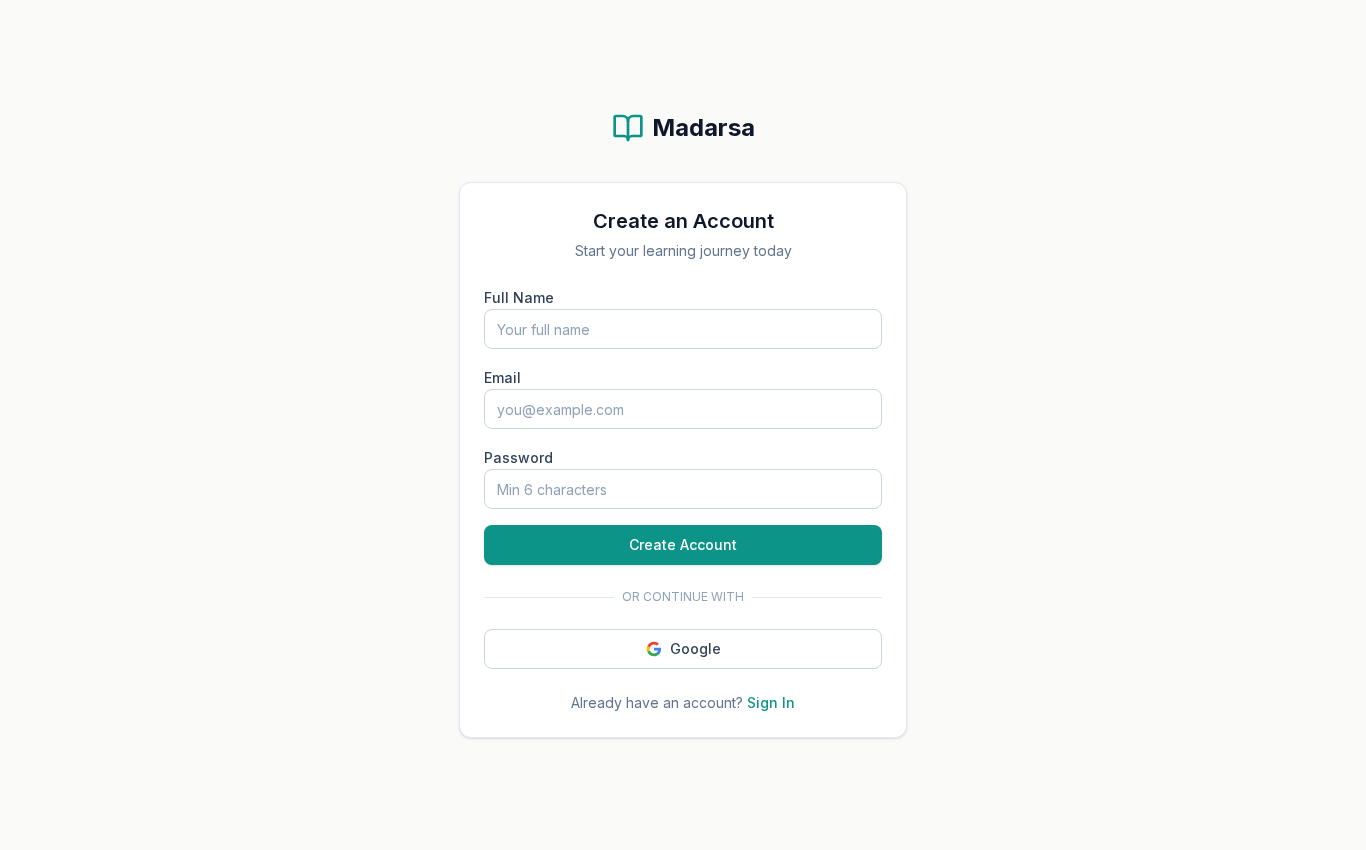
You'll be asked for three things:
- Full name — appears on your certificate when you finish a course.
- Email address — used for sign-in, password reset, and course notifications.
- Password — at least 8 characters. Use something you'll remember; you can also reset it later.
Or click Continue with Google — fastest if you already have a Gmail account.
After clicking Sign Up, check your inbox (and the Spam folder) for a confirmation email. You must click the confirmation link before signing in.
اردو ترجمہ — Urdu Translation
چوتھا قدم — اکاؤنٹ بنائیں (Sign Up): داخلہ لینے کے لیے ایک اکاؤنٹ (Account) ضروری ہے۔ اوپر دائیں جانب Get Started پر کلک کریں، یا کسی بھی کورس پر Buy Now دبائیں — دونوں سائن اَپ پیج (Sign Up Page) پر لے جائیں گے۔
تین چیزیں درکار ہوں گی:
- پورا نام (Full Name) — یہ نام آپ کے سرٹیفکیٹ (Certificate) پر چھپے گا، اس لیے درست لکھیں۔
- ای میل ایڈریس (Email Address) — اس کے ذریعے آپ سائن اِن (Sign In) کریں گے، پاس ورڈ ریسیٹ (Password Reset) کر سکیں گے، اور کورس کی اطلاعات (Notifications) پائیں گے۔
- پاس ورڈ (Password) — کم از کم آٹھ حروف، کوئی ایسی ترکیب جو آپ کو یاد رہے۔ بعد میں ریسیٹ بھی ہو سکتا ہے۔
یا براہ راست Continue with Google دبا کر اپنے جی میل (Gmail) سے سائن اَپ کر لیں — یہ سب سے تیز طریقہ ہے۔
ضروری: سائن اَپ کے بعد اپنا ای میل ان باکس (Inbox) چیک کریں — اور اسپام (Spam) فولڈر بھی۔ ایک تصدیقی ای میل (Confirmation Email) آئے گی، اس پر دیے گئے لنک پر کلک کرنا ضروری ہے، تب ہی آپ سائن اِن کر پائیں گے۔
🔑 Step 5 — Sign in
Once your email is confirmed, return to madarsa.in and click Sign In.
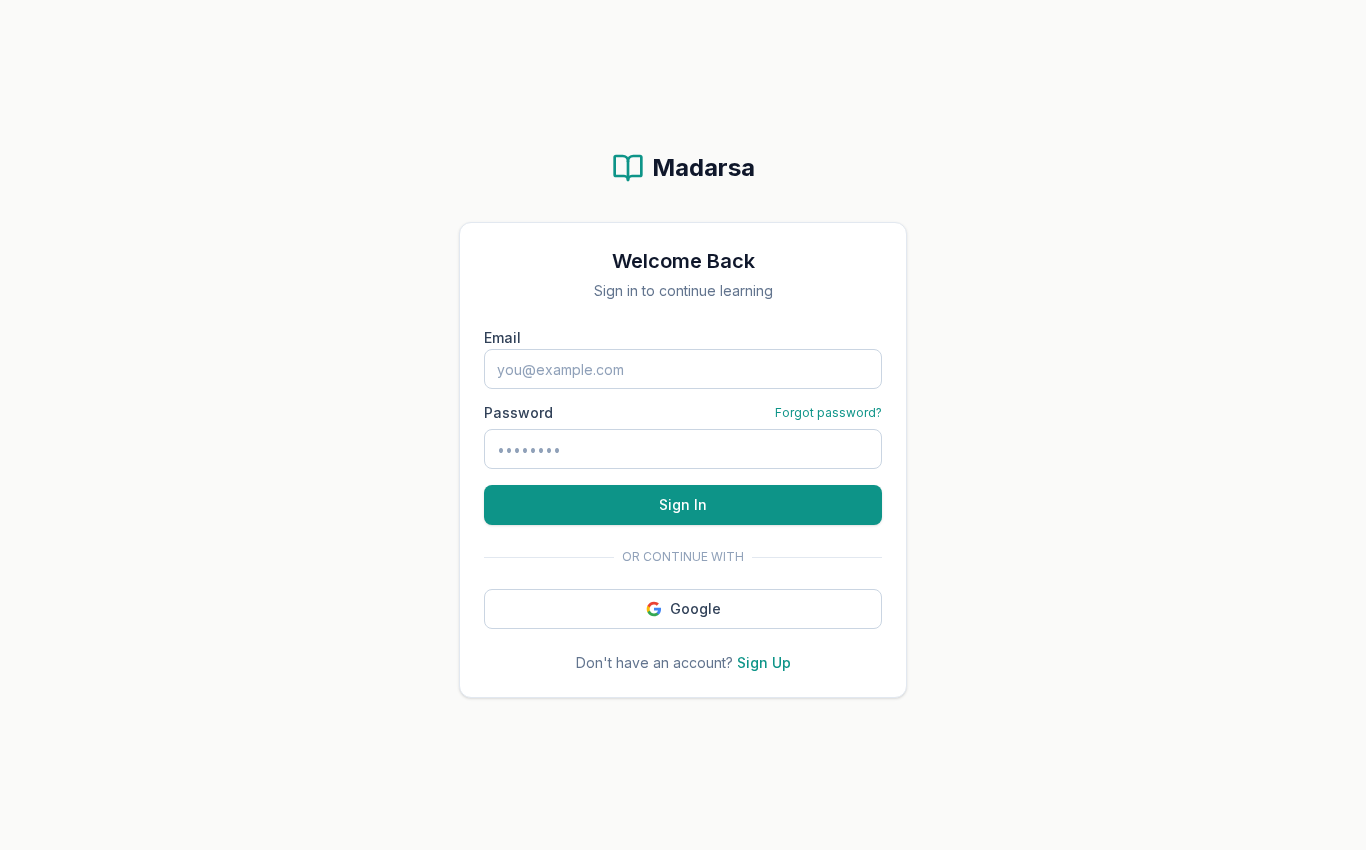
Type the same email and password you used at sign-up. Forgot your password? Click Forgot password? — Madarsa will email you a reset link valid for one hour.
اردو ترجمہ — Urdu Translation
پانچواں قدم — سائن اِن کریں (Sign In): ای میل تصدیق ہونے کے بعد دوبارہ madarsa.in پر آئیں اور اوپر Sign In پر کلک کریں۔ وہی ای میل اور پاس ورڈ ڈالیں جو آپ نے سائن اَپ کرتے وقت استعمال کیا تھا۔
اگر پاس ورڈ بھول گئے ہیں تو Forgot password? پر کلک کریں — مدرسہ آپ کو ای میل پر ریسیٹ لنک (Reset Link) بھیجے گا جو ایک گھنٹے تک کارآمد رہتا ہے۔
💳 Step 6 — Enroll: free vs paid courses
Now go back to the course you want and click the enrol button:
🆓 Free course
Click Enroll Free. You're in instantly — no payment screen.
💰 Paid course
Click Buy Now — ₹X. You'll be redirected to PayU or Razorpay to complete the payment using UPI / card / netbanking / wallet.
After successful payment you're redirected back to Madarsa, the course is added to My Courses, and the button on the course page turns into Continue Learning.
اردو ترجمہ — Urdu Translation
چھٹا قدم — داخلہ لیں: اب اس کورس پر واپس جائیں جسے آپ خریدنا چاہتے ہیں اور داخلے کا بٹن دبائیں۔
- مفت کورس (Free Course): صرف Enroll Free پر کلک کریں — کوئی ادائیگی نہیں، آپ فوراً داخلہ پا جائیں گے۔
- ادا شدہ کورس (Paid Course): Buy Now — ₹X دبائیں۔ آپ کو پے یو (PayU) یا ریزر پے (Razorpay) کے صفحے پر بھیجا جائے گا، جہاں آپ یو پی آئی (UPI)، کارڈ (Card)، نیٹ بینکنگ (Net Banking) یا والٹ (Wallet) سے ادائیگی کر سکتے ہیں۔
کامیاب ادائیگی کے بعد آپ خود بخود مدرسہ پر واپس آ جائیں گے، کورس My Courses میں شامل ہو جائے گا، اور کورس پیج پر بٹن کا نام Continue Learning ہو جائے گا۔
🎟️ Step 7 — Apply a coupon code (optional)
Many courses come with a coupon for an extra discount. If you have one, click the Have a coupon? link just above the price.
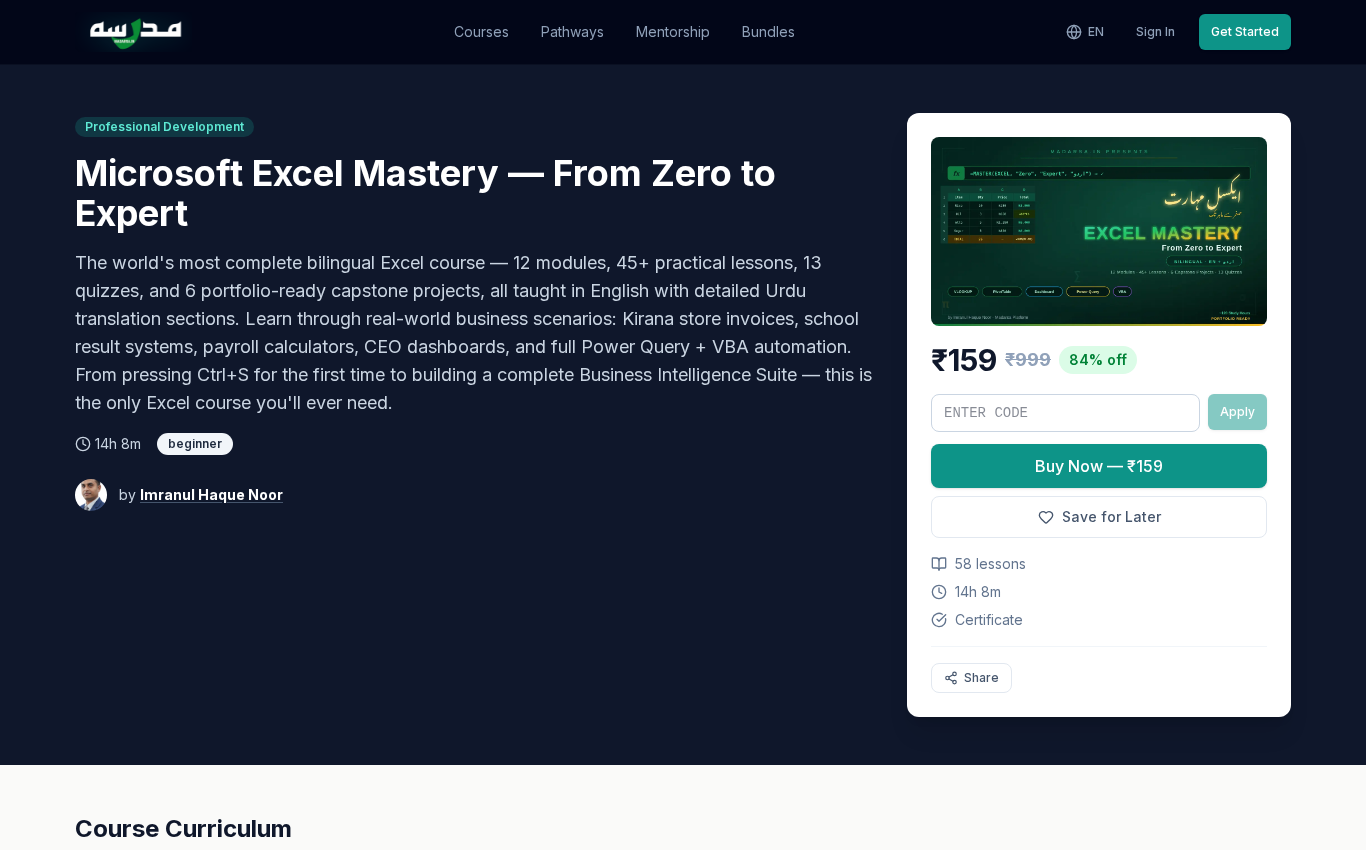
An input box opens. Type your code and press Apply.
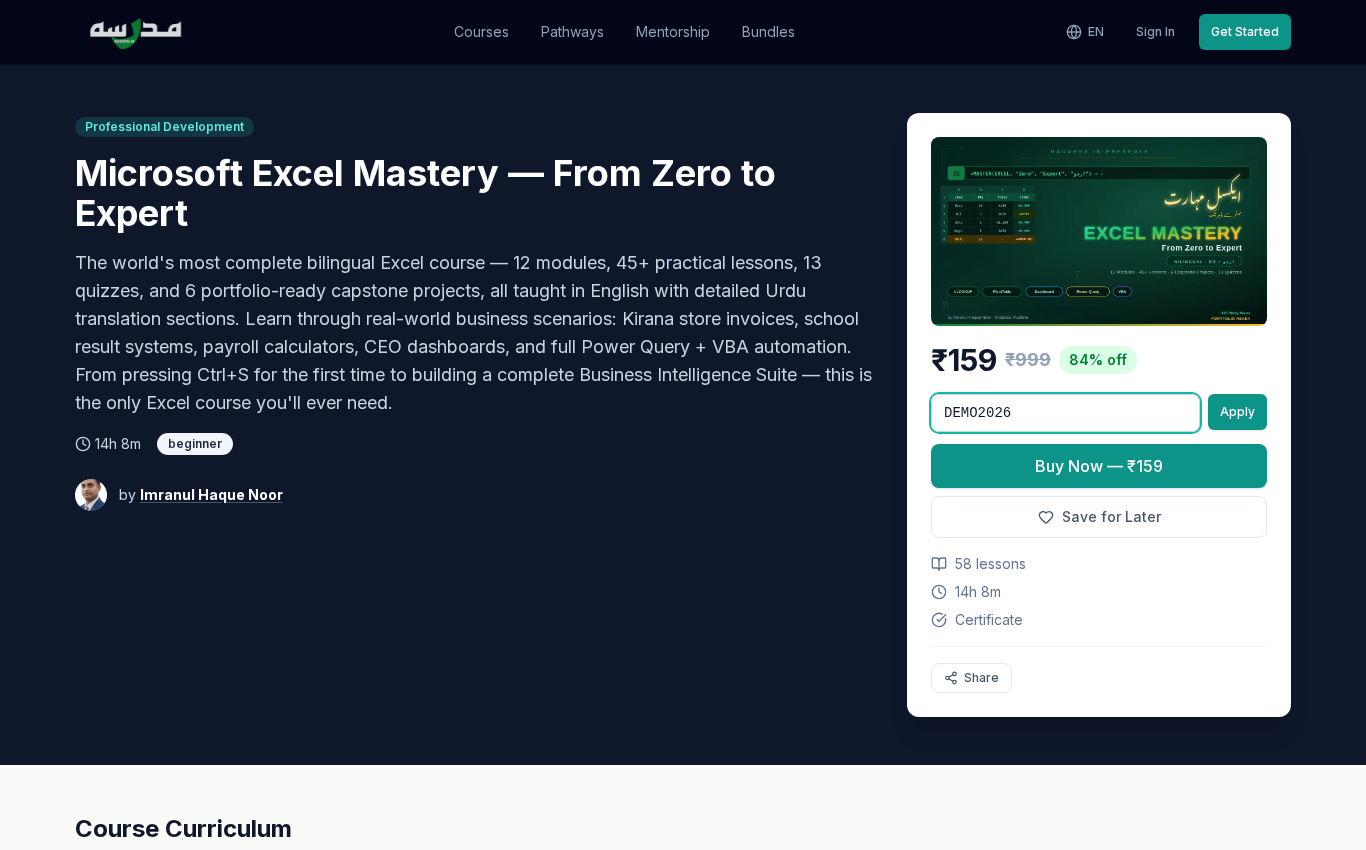
If you click Apply before signing in, you'll see a friendly message — “Please sign in to apply a coupon. Redirecting…” — and you'll be sent to the sign-in page. Once you sign in, the coupon you typed is auto-applied. You don't have to retype it.
If the coupon is valid, you'll see a green confirmation showing the discount amount and the new final price. The percentage badge updates automatically. The coupon stacks on top of the existing MRP discount, so you save twice.
اردو ترجمہ — Urdu Translation
ساتواں قدم — کوپن کوڈ لگائیں (Coupon Code): بہت سے کورسز کے ساتھ ایک خصوصی کوپن (Coupon) ملتا ہے جو اضافی رعایت دیتا ہے۔ اگر آپ کے پاس کوپن ہے تو قیمت کے اوپر دیے گئے Have a coupon? لنک پر کلک کریں۔
ایک ان پٹ باکس (Input Box) کھل جائے گا۔ اپنا کوڈ ٹائپ کریں — یہ خود بخود بڑے حروف (Capital Letters) میں بدل جاتا ہے — اور Apply دبائیں۔
اہم: اگر آپ سائن اِن (Sign In) کیے بغیر Apply دباتے ہیں تو ایک پیغام آئے گا — “Please sign in to apply a coupon. Redirecting…” — اور آپ کو سائن اِن پیج پر بھیج دیا جائے گا۔ سائن اِن مکمل ہوتے ہی وہی کوپن خود بخود لگ جائے گا — آپ کو دوبارہ ٹائپ کرنے کی ضرورت نہیں۔
اگر کوپن درست ہے تو سبز رنگ میں تصدیق آئے گی، رعایت کی رقم اور نئی فروخت قیمت (Final Price) دکھائی جائے گی۔ کوپن موجودہ ایم آر پی رعایت کے اوپر لگتا ہے، یعنی آپ کی بچت دگنی ہو جاتی ہے۔
🎓 Step 8 — Start learning
Once enrolled, head to My Courses from the top right.
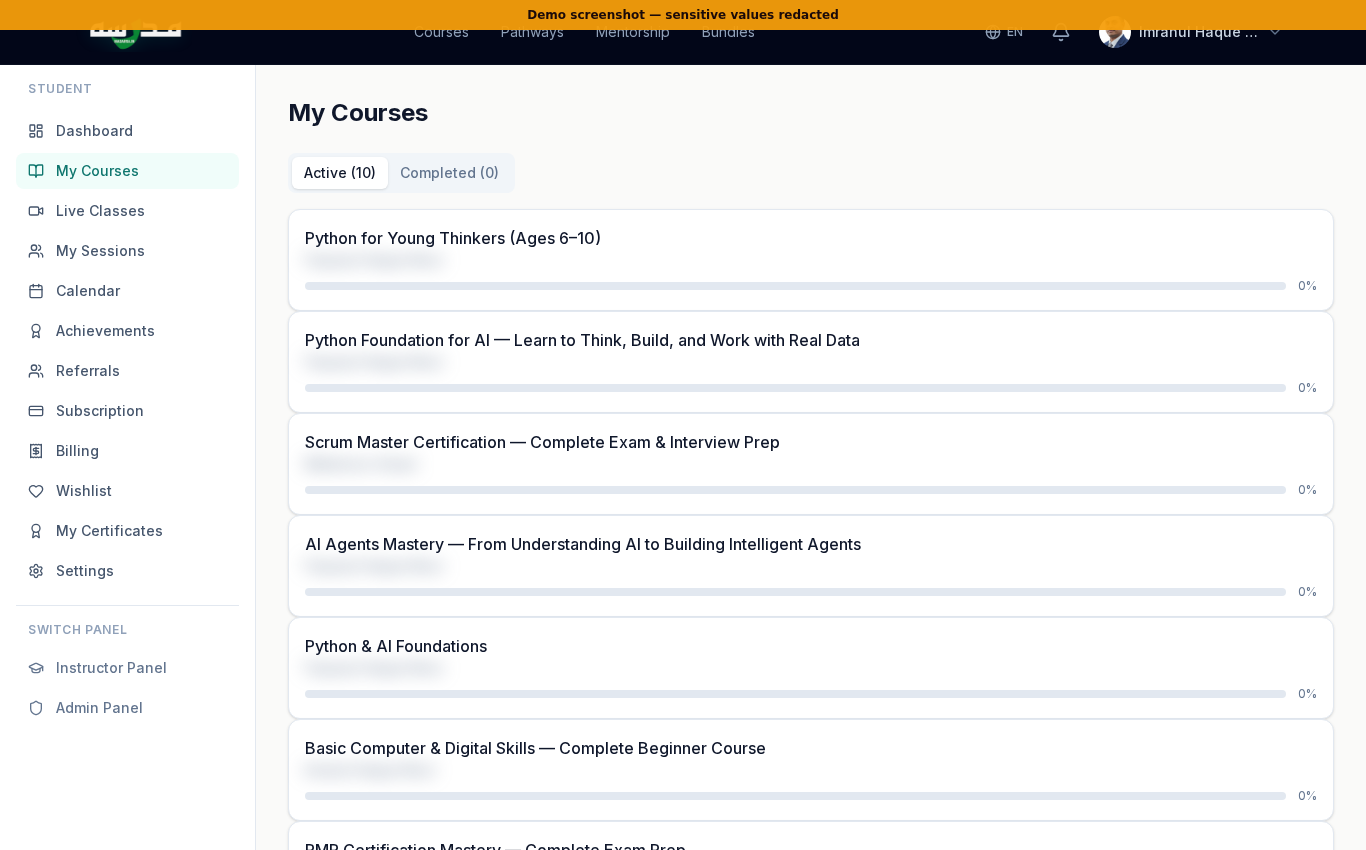
Click any course to open the lesson player. Lessons unlock in order — finish one to enable the next.
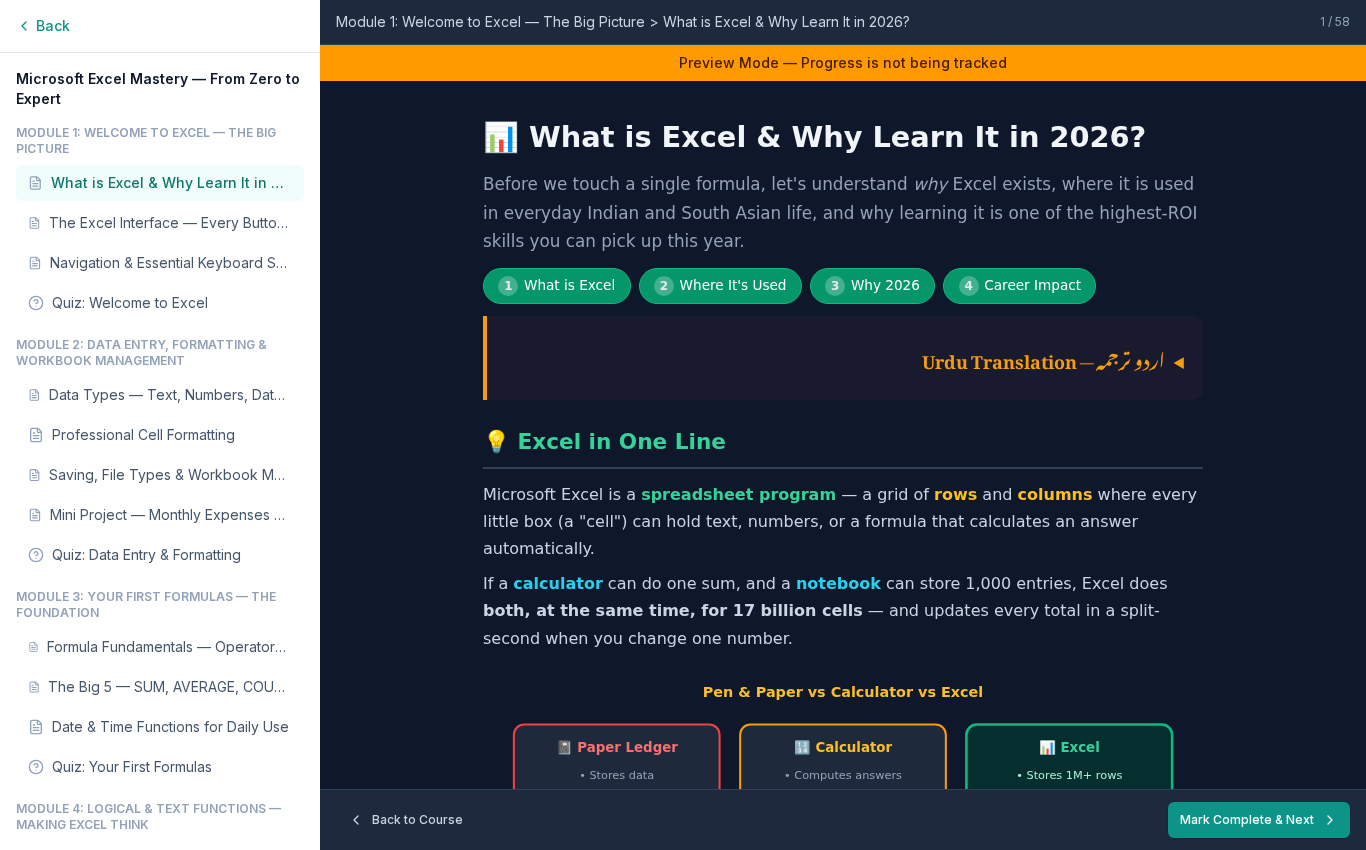
The lesson player has the curriculum on the left, lesson content in the middle, and (on most courses) the AI Tutor chat panel and your notes on the right. After the last lesson, the certificate is issued automatically — you can download or share it.
اردو ترجمہ — Urdu Translation
آٹھواں قدم — سیکھنا شروع کریں: داخلہ مکمل ہو جانے کے بعد اوپر دائیں جانب اپنی پروفائل (Profile) پر کلک کریں اور My Courses میں جائیں۔ یہاں آپ کے تمام داخل شدہ کورسز کی فہرست ہوگی، ساتھ میں ہر کورس میں آپ نے کتنا حصہ مکمل کیا ہے یہ پروگریس بار (Progress Bar) دکھائی دے گا۔
کسی بھی کورس پر کلک کریں تو لیسن پلیئر (Lesson Player) کھل جائے گا۔ لیسنز ترتیب سے کھلتے ہیں — ایک مکمل کریں تو اگلا کھل جاتا ہے۔ ہر لیسن کے نیچے ایک بٹن ہوتا ہے: Mark Complete & Next — اسے دبا کر آپ اگلے لیسن پر چلے جاتے ہیں اور ترقی (Progress) محفوظ ہو جاتی ہے۔
لیسن پیج پر بائیں طرف نصاب (Curriculum)، درمیان میں لیسن کا مواد (Content)، اور دائیں طرف اے آئی ٹیوٹر (AI Tutor) چیٹ پینل اور آپ کے نوٹس (Notes) ہوتے ہیں۔ آخری لیسن مکمل کرنے پر سرٹیفکیٹ (Certificate) خود بخود جاری ہو جاتا ہے — آپ اسے ڈاؤن لوڈ یا شیئر کر سکتے ہیں۔
📊 Your dashboard at a glance
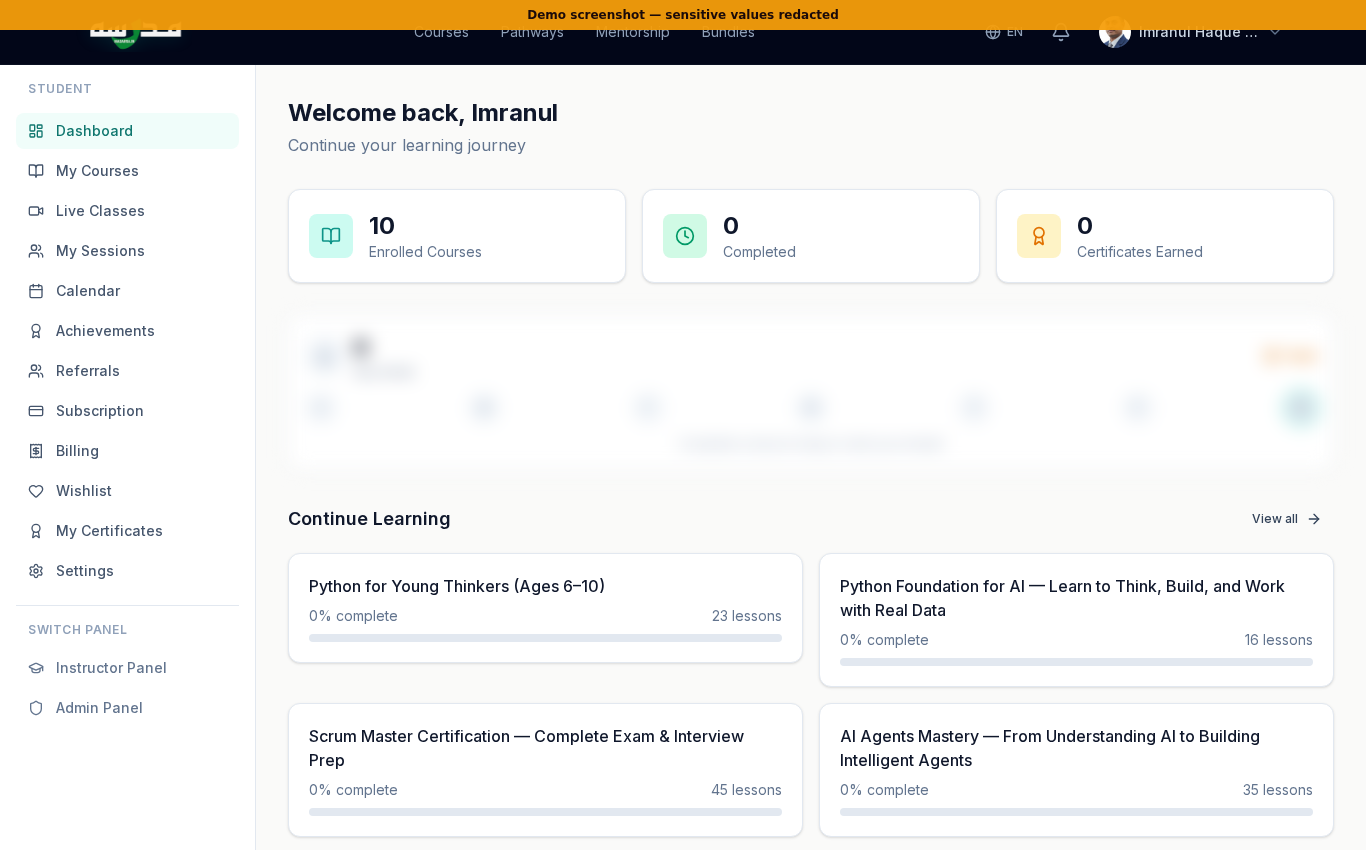
The dashboard pulls everything together: courses in progress, certificates earned, upcoming live classes, mentorship sessions you've booked, achievements, and your wishlist. A good place to start every learning session.
اردو ترجمہ — Urdu Translation
آپ کا ڈیش بورڈ (Dashboard): اوپر دیا گیا اسکرین شاٹ آپ کے ذاتی ڈیش بورڈ کا ہے جو /dashboard پر ملتا ہے۔ یہاں ایک ساتھ نظر آتا ہے: جاری کورسز (Courses in Progress)، ملنے والے سرٹیفکیٹس (Certificates Earned)، آنے والی لائیو کلاسز (Upcoming Live Classes)، بک کی گئی مینٹرشپ سیشنز (Mentorship Sessions)، اچیومنٹس (Achievements)، اور آپ کی وش لسٹ (Wishlist)۔ ہر سیکھنے کا سیشن یہاں سے شروع کرنا اچھا رہتا ہے۔
💡 Tips for first-time students
Start with a free course
Try the “Basic Computer & Digital Skills” free course before paying — it shows you the lesson player, quizzes, and progress tracking without any cost.
Pick the right language
Use the EN/UR/HI switcher early. Bilingual courses show Urdu and English side-by-side; pure-Urdu courses are written in Nastaliq.
Enable notifications
From Settings → Notifications, allow email reminders for lessons and live classes — it dramatically improves completion rate.
Use the AI Tutor
Most courses have a small chat panel inside the lesson. Ask in Urdu if you want — the tutor handles bilingual questions.
Save courses for later
Click the heart icon on any course to add it to your wishlist. Useful when you find something interesting but aren't ready to enrol yet.
Use a coupon if you have one
Founder pricing already discounts the MRP. Adding a coupon stacks an additional discount — that's where ₹999 courses become ₹49 or even free.
اردو ترجمہ — Urdu Translation
پہلی بار طلباء کے لیے مشورے (Tips for First-Time Students):
- پہلے ایک مفت کورس آزمائیں: ادائیگی سے پہلے Basic Computer & Digital Skills یا Instructor Guide جیسا مفت کورس کھول کر دیکھ لیں — اس سے آپ کو لیسن پلیئر (Lesson Player)، کوئز (Quiz) اور پروگریس (Progress) کا اندازہ ہو جائے گا، بغیر کوئی روپیہ خرچ کیے۔
- صحیح زبان منتخب کریں: اوپر دیے گئے EN / UR / HI سوئچر سے زبان طے کر لیں۔ دو لسانی (Bilingual) کورسز اردو اور انگریزی دونوں دکھاتے ہیں۔ مکمل اردو کورسز نستعلیق (Nastaliq) میں لکھے ہوتے ہیں۔
- اطلاعات (Notifications) آن کریں: سیٹنگز (Settings) سے ای میل اطلاعات کی اجازت دیں — اس سے لیسن اور لائیو کلاس کی یاد دہانی ملتی ہے، اور کورس مکمل کرنے کا تناسب کافی بڑھ جاتا ہے۔
- اے آئی ٹیوٹر (AI Tutor) استعمال کریں: زیادہ تر لیسنز میں ایک چھوٹا چیٹ پینل (Chat Panel) ہوتا ہے۔ آپ اردو میں سوال کر سکتے ہیں — ٹیوٹر دو لسانی سوالات سمجھتا ہے۔
- کورسز بعد کے لیے محفوظ کریں: دل (Heart Icon) پر کلک کر کے کسی بھی کورس کو وش لسٹ (Wishlist) میں ڈال دیں — جب آپ تیار ہوں، خرید لیں۔
- کوپن کا فائدہ اٹھائیں: بانی قیمت پہلے ہی ایم آر پی سے رعایت دیتی ہے۔ کوپن لگانے سے ایک اضافی رعایت ملتی ہے — اسی طرح ۹۹۹ کا کورس ۴۹ روپے یا مفت تک ہو جاتا ہے۔
❓ Common questions
Do I need to install an app?
No. Madarsa runs in any browser — Chrome, Firefox, Safari, or your phone's default browser. There's no app to download.
Is the certificate accepted by employers?
Course certificates are platform-issued and primarily useful for personal LinkedIn portfolios. For internationally recognised credentials (PMP, Scrum), the Madarsa course prepares you for the official certifying body's exam — Madarsa itself does not issue the official credential.
Can I get a refund?
Yes — within the refund window listed on the course page (typically 7 days), and as long as you've completed less than 25% of the lessons. Read the Refund Policy at /refund-policy for the full terms.
Can I pay in installments?
Not yet. All paid courses are one-time payment for now. The yearly Subscription bundle gives unlimited access to most courses for one fee — see /subscription.
My coupon was rejected — why?
Coupons are course-scoped, time-limited, and have minimum amounts. If you typed it correctly and it still fails, the coupon is likely expired or doesn't apply to that course. Try a different coupon or contact support.
اردو ترجمہ — Urdu Translation
عام سوالات (Common Questions):
- کیا کوئی ایپ (App) ڈاؤن لوڈ کرنی ہوگی؟ — نہیں۔ مدرسہ کسی بھی براؤزر (Browser) میں چلتا ہے، موبائل کا ڈیفالٹ براؤزر بھی شامل ہے۔ کوئی ایپ نہیں چاہیے۔
- کیا سرٹیفکیٹ (Certificate) آجر (Employer) قبول کریں گے؟ — مدرسہ کا سرٹیفکیٹ پلیٹ فارم کی طرف سے ہوتا ہے، جو لنکڈ اِن (LinkedIn) پروفائل کے لیے مفید ہے۔ بین الاقوامی سرٹیفکیشنز (International Certifications) جیسے پی ایم پی (PMP) یا سکرم (Scrum) کے لیے کورس آپ کو اصل امتحان کے لیے تیار کرتا ہے، اصل سرٹیفکیٹ متعلقہ ادارہ جاری کرتا ہے، مدرسہ نہیں۔
- کیا ریفنڈ (Refund) ملتا ہے؟ — جی ہاں، کورس پیج پر دی گئی ریفنڈ ونڈو (عام طور پر سات دن) کے اندر، اور بشرطیکہ آپ نے ۲۵٪ سے کم کورس مکمل کیا ہو۔ مکمل پالیسی
/refund-policyپر ہے۔ - کیا قسطوں میں ادائیگی (Installment) ممکن ہے؟ — ابھی نہیں۔ تمام ادا شدہ کورسز یک وقتی (One-time) ہیں۔ سالانہ سبسکرپشن (Yearly Subscription) تمام کورسز تک رسائی دیتی ہے ایک ہی ادائیگی میں — تفصیل
/subscriptionپر۔ - کوپن (Coupon) قبول کیوں نہیں ہوا؟ — کوپن مخصوص کورس، وقت اور کم از کم رقم کے ساتھ بندھے ہوتے ہیں۔ اگر کوڈ درست لکھا ہے اور پھر بھی ناکام ہے، تو غالباً وہ کوپن یا تو ختم ہو چکا ہے یا اس کورس پر لاگو نہیں ہوتا۔
🎬 Video walkthrough
🌱 Closing
That's it — you now have an account, a course, and a path forward. The first lesson is the hardest one to start, but the easiest one to finish. Open it, finish it, mark it complete, and you're already further along than most learners who never start. Ramadan or otherwise, the only honest motto is Bismillah — start today.
Last updated: 2026-05-09. Screenshots from the live madarsa.in. If a screen looks slightly different in your browser, the platform may have been updated — the steps remain the same.
Enjoyed this article?
Subscribe to our newsletter for more articles, tutorials, and insights delivered straight to your inbox.